Book an Appointment
Choose the service you would like to book:

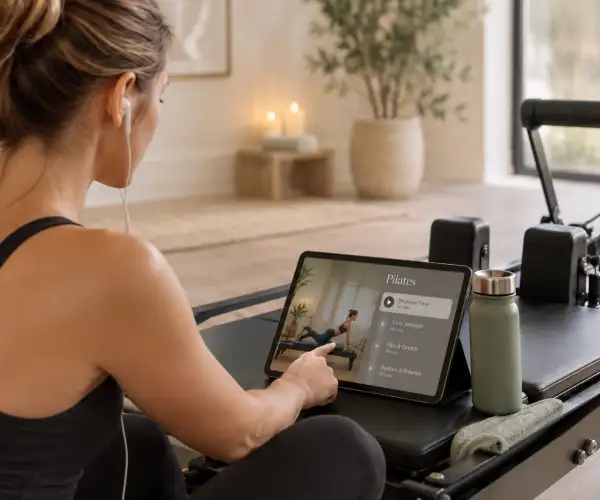
Or Download our app to make booking even easier!
Managing your appointments or classes on our mobile app couldn't be easier! Download from your app store below:
Download from the Apple app store here.
Download from google play store here.
If you have received a welcome email from us, follow the "Welcome Email Received" path.
If you are an existing patient / client who had an appointment prior to 10th August 2026 follow the "Existing Patients / Clients" path.
Anyone else follow the "New Patients / Clients" path.
Existing Patients / Clients
Twin Rivers Osteopathy has recently moved to Pogozo to handle all our Osteopathic and Pilates bookings, and have transferred all our existing patients into this system. This means a Pogozo account has already been created for you and all you need to do is reset your password and complete the sign up process. Follow the steps below to complete:
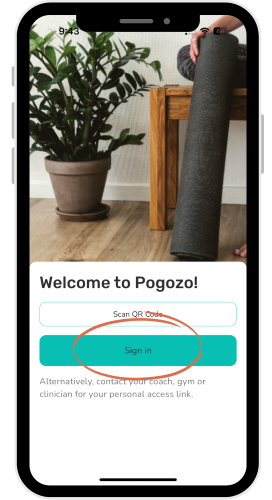
Open the Pogozo app and click Sign in.
Click on Forgot password?
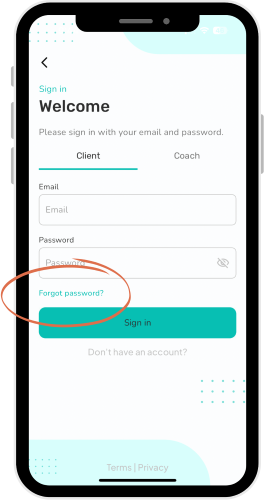
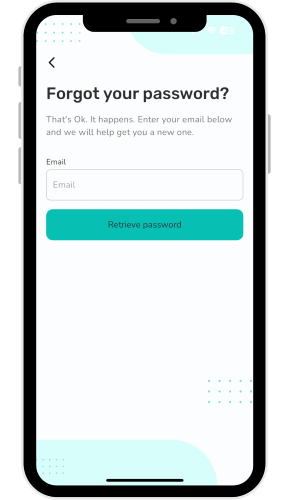
Enter your email address and click Retrieve password. N.B. This needs to be the same email address that you have given us! Have a look at an old appointment reminder if unsure.
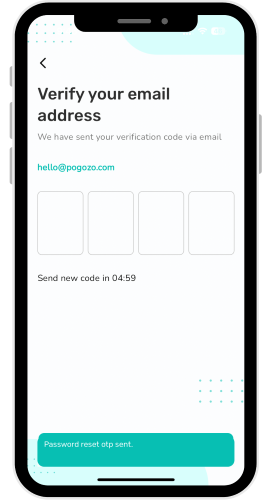
An email will be sent to your account with a 4 digit verification code. Enter the verification code and select continue.
You will then be prompted to create a new password.
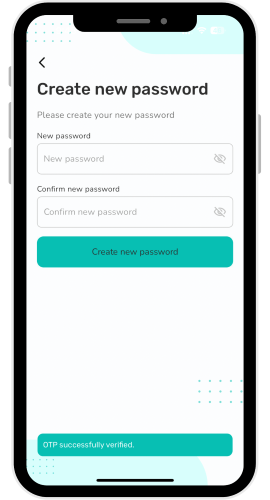
Your new password will need:
- A capital letter
- A lower case letter
- A number
- One of these special characters [@ $ ! % * ? & #]
- And be more than 8 characters long
Once you have chosen a new password, follow the prompts, filling in your details as you go along. You can skip some steps if given the option at the bottom of the screen.
If you would like to set up family members as dependants such as children, you can do this now, otherwise you can skip and add them to your account at a later date.
You should then arrive at your personalised Pogozo dashboard.
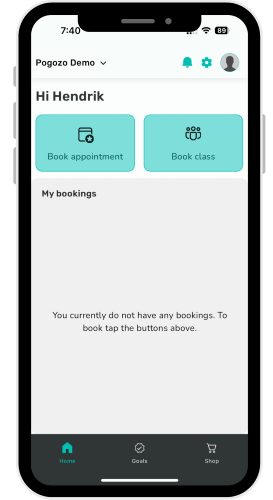
Use the Book appointment button to book Osteopathic appointments, and to buy Pilates packages, use the Shop button on the bottom right. If you have already purchased a Pilates package, use the Book class button to schedule the classes.
All your bookings will be displayed on your dashboard.
New Patients / Clients (Anyone who has never booked or been to us);
If you have received a welcome email with your username and temporary password proceed to the "Welcome Email Received" section. Otherwise continue below.
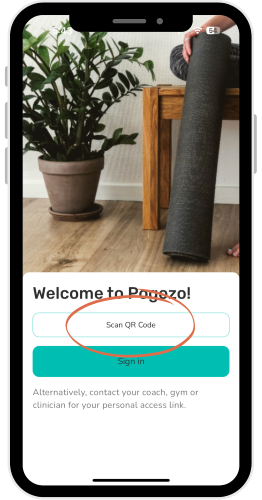
Open the Pogozo app and click Scan QR code.
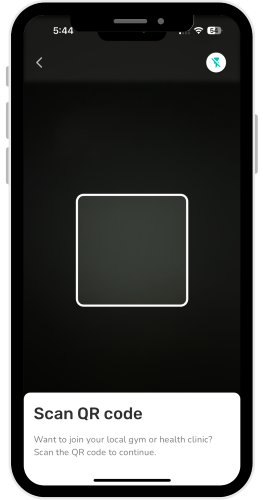
Hold your phone up to the QR code and wait for it to scan.
Here is the QR Code:

You should then be redirected to a Welcome page. Enter your email and click Continue.
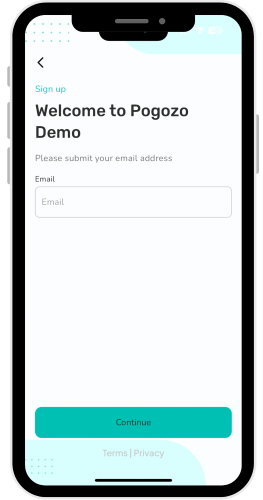
You will then be prompted to fill in some details and create a password. Once you have created a password, continue to follow the prompts, filling in the rest of your details as you go along. You can skip some steps if given the option at the bottom of the screen.
If you would like to set up family members as dependants such as children, you can do this now, otherwise you can skip and add them to your account at a later date.
You should then arrive at your personalised Pogozo dashboard.
Use the Book appointment button to book Osteopathic appointments, and to buy Pilates packages, use the Shop button on the bottom right. If you have already purchased a Pilates package, use the Book class button to schedule the classes.
All your bookings will be displayed on your dashboard. That's it! You're all set to go. No need to continue to the next steps.
Welcome Email Received
Follow the steps below if you have received a welcome email from us with a username and temporary password.
When we add you into our system (for example when you call to book an appointment over the phone), Pogozo will send you an email containing your username and temporary password.
Once you have your welcome email, open the Pogozo app and click Sign in.
Enter your email and temporary password and click Sign in.
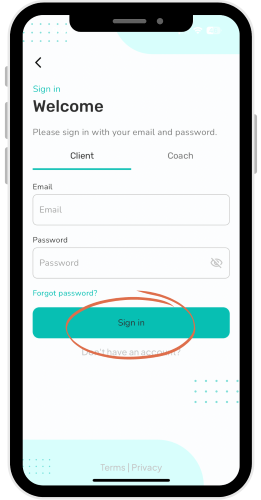
ou will then be prompted to change your password to something more memorable for you.
Once you have chosen a new password, follow the prompts, filling in your details as you go along. You can skip some steps if given the option at the bottom of the screen.
If you would like to set up family members as dependants such as children, you can do this now, otherwise you can skip and add them to your account at a later date.
You should then arrive at your personalised Pogozo dashboard.
Use the Book appointment button to book Osteopathic appointments, and to buy Pilates packages, use the Shop button on the bottom right. If you have already purchased a Pilates package, use the Book class button to schedule the classes.
All your bookings will be displayed on your dashboard.
Medicare
If you have a long-term (chronic) issue, you may be eligible to receive a Chronic Disease Management (CDM) plan from your GP. Formerly known as Enhanced Primary Care (EPC) plans, these provide you with up to 5 Allied Health treatments in a calendar year that Medicare will rebate. You will be required to pay the full amount for your treatment, then we swipe your Medicare card, and the rebate goes straight into your bank account. The current amount that Medicare rebates as of July 2026 is $63.40 per treatment.
Chronic Disease Management Plan referral from GP - Medicare rebate amounts are determined by the Federal Government and do not reflect the true cost of modern general practice care.
👉 View more information:
AMA Fees Information Poster (PDF)
Private Health Insurance
If you have private health insurance with extras, you may be able to claim back some of the cost of your treatment. We have a HICAPS machine at the clinic, so we can take the rebate off your treatment on the spot. The rebate amount will vary depending on your health fund and level of cover.
Concession Consultations
- You have a Pensioner Concession Card
- You have a Health Care Card
If you believe you are eligible for a concession price, please make a note of it in your online booking, or mention it to our reception team or your osteopath.
TAC and Workcover
Consultations related to work-related injuries (WorkCover) or motor vehicle accidents (TAC) are not covered by Medicare. The cost for these consultations is the responsibility of the patient at the time of the appointment. Once your claim has been approved, you may seek reimbursement directly from WorkCover or TAC.
Department of Veterans' Affairs (DVA)
If you hold a Department of Veterans’ Affairs (DVA) Gold Card, standard consultations are covered by DVA. Some longer or additional services may incur a private fee, which will be discussed with you at the time of your appointment.
Home Care Packages
If you receive a home care package, you may be able to have osteopathic treatment covered by your package funding. Osteopathy can help you to maintain an independent and active lifestyle, which is the goal of Home Care Packages. If you would like osteopathic treatment covered under your Home Care Package, please speak to your care manager/provider.
We are ready when you are
Twin Rivers Osteopathy offers a wide range of Osteopathic services & treatments covering back pain, neck pain, shoulder pain, knee pain, headaches, upper back pain, sports injuries, work-related injuries and ergonomic assessment.